





How Often Should You Charge Drone Batteries
Time: 2025-09-17 11:16:32
Drone batteries impact flight duration, stability and safety. Good ones secure missions, poorly charged ones risk crashes or power loss. Users (novice/professional) often ask: How often to charge? Fully after each flight or only when needed? How to manage during long inactivity? This article explores charging frequency and best practices via battery type, usage scenarios, etc., to boost flight safety and extend battery life.
Understanding the Fundamentals of Drone Batteries
Mainstream drone batteries are categorised into lithium polymer (LiPo) and lithium-ion (Li-ion) types. LiPo batteries offer high energy density and lightweight properties, making them the preferred choice for both consumer and professional-grade drones. Li-ion batteries boast extended cycle life and lower costs, suitable for certain entry-level or industrial-grade drones.
Drone batteries store and discharge energy through chemical reactions, with the ‘charge cycle’ serving as the core indicator of lifespan. A cycle is counted when the cumulative discharge equals the battery's capacity (e.g., charging from 10% to 100%, then from 30% to 100% before discharging back to 30%). Mainstream batteries typically endure 300-500 cycles, after which capacity and performance decline significantly.
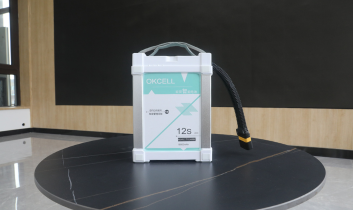
Charging habits directly impact battery longevity: overcharging, deep discharging, or prolonged storage at full/low charge accelerate electrode degradation. Proper charging practices mitigate this decline, preserving battery performance. OKCELL batteries can achieve a cycle life of over 1000 cycles when used with good habits.

Key Factors Affecting Charging Frequency
There is no fixed standard for drone battery charging frequency; adjustments should be made based on actual usage conditions.
Usage Frequency: Daily Users vs Occasional Users
Daily users (flying daily or every 2-3 days): Batteries undergo high-frequency use with typically low remaining charge. It is advisable to charge promptly after each flight to ensure sufficient power for the next operation.
Occasional users (flying 1-2 times monthly): If remaining charge exceeds 50% post-flight, full recharge is unnecessary. Charge 1-2 days before next flight to avoid prolonged full-charge storage.
Battery Capacity and Drone Type
Consumer-grade drones: Battery capacity 2000-3000mAh, flight duration 20-30 minutes. Multiple daily flights require frequent recharging.
Professional-grade drones (e.g., agricultural spraying drones, industrial aerial survey drones): Battery capacity exceeds 5000mAh, with flight times of 40-60 minutes per session, requiring less frequent charging.
However, due to complex missions and rapid discharge, post-flight charging decisions should be made promptly based on remaining charge levels.
Environmental Conditions: Temperature and Humidity Effects
LiPo and Li-ion batteries are temperature-sensitive:
- High temperatures (above 35°C) accelerate self-discharge, reduce charging efficiency, and may cause swelling.
- Low temperatures (below 0°C) reduce battery activity and discharge capacity, potentially leading to falsely high remaining charge readings. Avoid charging in cold conditions.
High humidity may cause battery terminal oxidation. After use in damp conditions, wipe terminals dry before recharging.
Storage Practices: Short-Term vs Long-Term Storage
Short-term storage (use within 1-2 weeks): Store directly at 30%-70% charge. Below 30%, top up to 30%-50%. Above 70%, discharge briefly via flight before storing.
Long-term storage (idle for over one month): Charging frequency and charge level management become more stringent. Specific requirements are detailed in the subsequent section ‘Recommended Charging Frequency for Different Scenarios’.
Recommended Charging Frequency for Different Scenarios
Frequent Users (Daily/Weekly Use)
Charge immediately after each flight: As the battery temperature is elevated post-flight, allow it to cool for 15-30 minutes to room temperature before using the original charger to fully charge it, ensuring optimal performance for the next flight.
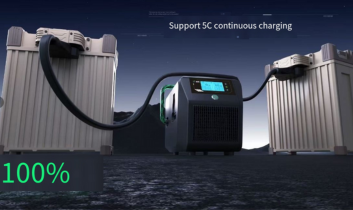
For multiple flights in a single day, use the original fast charger (avoid prolonged fast charging to prevent accelerated ageing), monitor battery temperature, and pause charging if it becomes excessively high, allowing it to cool before resuming.
Occasional Users (Monthly Use)
Full charging after each flight is unnecessary: Store directly if remaining charge exceeds 50%; charge to full capacity 1-2 days before the next flight. If below 30%, top up to 30%-50% after flight for storage, then fully charge before next use.
Long-Term Storage (Weeks/Months of Non-Use)
Adjust charge level to 30%-60% before storage (this range minimises internal chemical reactions and degradation); During storage, inspect the charge level every 3-4 weeks. If below 30%, recharge to 30%-40%. If above 60%, no discharge is required.
Store batteries in a dry, well-ventilated environment at 10-25°C. Avoid direct sunlight, proximity to heat sources or damp areas, and do not store alongside metallic objects to prevent short circuits.
Critical Pre-Flight Checks
Prior to undertaking critical missions such as commercial aerial photography or emergency inspections, ensure the battery is fully charged regardless of its previous state. Inspect for:
- No swelling, scratches, or leakage on the exterior;
- Clean, oxidation-free connectors;
- Cycle count via the app, with cell voltage difference below 0.1V.
Immediately cease use upon detecting any anomalies. Replace with a spare battery to prevent mission failure or safety incidents.

Best Practices for Drone Battery Charging
Avoid Overcharging and Deep Discharging
Overcharging (leaving the charger connected for extended periods after full charge) causes excessive voltage, accelerating battery degradation. Deep discharging (continuing operation below 10% charge) damages cells
and shortens lifespan.
It is advisable to use original chargers with ‘automatic power-off’ functionality, which disconnect power once fully charged. For instance, when flying with OKCELL batteries, monitor the charge level via SPOWER and return to base immediately if it falls below 20%.
Use Genuine or High-Quality Compatible Smart Chargers
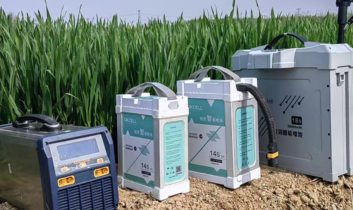
OKCELL drone battery chargers are matched to battery voltage and current for safety assurance. Compatible chargers must be certified brand products; avoid unbranded substandard chargers (lacking protection mechanisms, prone to causing battery overload).
Smart chargers featuring ‘cell balancing’ adjust cell voltages to extend battery life and should be prioritised.
Avoid Charging in Extreme Temperatures
Charge within 10–30°C environments, avoiding:
- Direct summer sunlight in vehicles or on balconies (exceeding 40°C);
- Unheated outdoor areas or garages in winter (below 0°C);
- Locations near air conditioning vents or heating sources (subject to significant temperature fluctuations).
Batteries exposed to extreme temperatures must be moved to ambient conditions and allowed to stabilise before recharging.
Periodic Calibration Cycles (Full Charge and Discharge)
After every 10-15 charge cycles, perform a calibration: discharge the battery below 10% (no lower than 5%), disconnect from the drone and leave undisturbed for 30 minutes, then fully charge to 100% using the original charger. Allow to rest for 10 minutes before use.
Calibration assists the Battery Management System (BMS) in recognising capacity, improving charge display accuracy and delaying performance degradation.
Recording Battery Usage and Health Status
Maintain a ‘Battery Usage Log’ documenting: purchase date, first use date, flight duration, charge cycles, total cycles, and anomalies (e.g., swelling, reduced endurance).
Replace the battery promptly when cycle count approaches 450 or endurance shows significant decline to mitigate risks.
Common Charging Pitfalls to Avoid
Prolonged Discharge Due to Delayed Charging
Forgetting to charge after flight and leaving the battery severely depleted (below 10%) for extended periods may cause irreversible cell damage, resulting in significantly reduced subsequent charge capacity. It is recommended to complete charging or adjust to storage voltage within 24 hours post-flight.
Long-Term Storage at Full Charge
Storing at full charge accelerates electrode corrosion, consumes electrolyte, and shortens battery lifespan. For short-term storage, maintain 30%-70% charge; for long-term storage, maintain 30%-60% charge.
Use of Substandard or Non-Original Chargers
Unbranded, low-quality chargers exhibit unstable current and voltage, potentially causing battery overheating and swelling. Some non-original chargers feature incompatible connectors; forced insertion may damage the battery. Always select original or brand-certified chargers.
Ignoring Battery Abnormalities
Battery swelling, overheating, leakage, sudden power drain, charging temperatures exceeding 45°C, significantly prolonged charging times, or unexpected power loss during flight all constitute health warnings. Immediately cease use, contact after-sales support, or replace the battery.
Function of OKCELL Smart Drone Batteries
OKCELL smart batteries incorporate an advanced Battery Management System (BMS) to optimise charging and discharging processes, with core functions as follows:

Integrated Self-Discharge and Power Management
During prolonged inactivity, battery levels above 60% will gradually self-discharge to 50%-60%; Below 30%, low-voltage protection activates to prevent over-discharge, reducing user maintenance costs.
Automatic Cell Balancing for Extended Lifespan
The integrated cell monitoring module dynamically adjusts cell voltages during charging, maintaining deviations under 0.05V. This prevents overcharging or over-discharging of individual cells, prolonging cycle life and enhancing power delivery stability.
Enhanced Safety and Performance Monitoring
Continuously monitors battery temperature, current, and voltage, cutting power or triggering app alerts during anomalies. Users may view cycle counts, remaining lifespan, and fault logs via the app to track battery health.
Prioritise manufacturer-authorised smart batteries (e.g., OKCELL Smart Batteries) for assured compatibility and safety.
Conclusion
The charging frequency of drone batteries is determined by usage frequency, battery type, environmental conditions, and storage habits. To ensure prolonged battery life, regular inspection and maintenance are required.
With over two decades of expertise in drone battery technology, OKCELL is setting industry standards through high-energy-density pouch cells and intelligent BMS battery solutions. Whether optimising endurance for high-frequency missions or ensuring safety in extreme conditions, OKCELL delivers bespoke power solutions. To learn more about drone batteries, contact us today.

点击右上角
分享给朋友吧







 Long by picture save/share
-

The Heart of Your Operation: A Complete Guide to the Agricultural Drone Battery
A deep dive into how agricultural drone batteries influence power, safety, flight time, and operational efficiency, offering essential insights on specs, maintenance, and choosing the right battery.
MORE -
How China Drone Battery Manufacturers Are Ensuring Quality and Safety
China’s drone battery manufacturers are raising industry standards through advanced engineering, strict safety controls, and reliable quality systems that ensure safer, longer, and more stable flight performance.
MORE -
Expert Guide to Agricultural Drone Battery Maintenance
Ensure safer, longer agricultural drone flights with practical battery maintenance guidance that helps prevent power loss, extend lifespan, and keep field operations efficient.
MORE -
What Are the Best Practices for Maximizing Drone Battery Performance
Maximizing drone battery performance starts with understanding how different missions stress power systems. Smarter charging, temperature control, and load management keep flights safer and longer.
MORE -
How to Charge a Drone Battery Safely and Effectively
Learn how to charge drone batteries safely and maximize performance with proper methods, smart charger choices, and essential practices that protect lifespan and flight reliability.
MORE -
Agricultural Drone Common Sense
Modern agricultural drones transform farming by enabling precise spraying, crop monitoring, and irrigation management, improving efficiency, sustainability, and smarter decision-making on farms.
MORE -
How Can Upgrading Your Drone Battery Improve Its Battery Life
Upgrading your drone battery can significantly extend flight time, stabilize power output, and improve reliability. Smarter chemistry and better design help every mission last longer and perform better.
MORE -
Essential Advice for Picking the Perfect Drone Battery
Discover how selecting the right drone battery impacts flight performance, efficiency, and reliability. Learn to match battery features with real-world needs for safe, stable, and long-lasting operation.
MORE -
How Custom Lithium Battery Packs Elevate UAV Performance
Custom lithium battery packs elevate UAV performance by extending flight time, enhancing stability, and ensuring safety, enabling drones to operate efficiently and reliably across demanding missions.
MORE -
Drone Battery Guide: Types, Safety, and Flight Time
Explore drone battery types, safety practices, and factors affecting flight time to maximize performance, extend lifespan, and ensure reliable operation for every mission.
MORE





Contact Us
With 18 years of extensive experience in battery production andcustomization, we have served thousands of clients. OKcell can providepersonalized one-stop customization services tailored exclusively for you.Contact us directly to explore our factory and products firsthand !
 Phone:+86 15093446331
 E-mail:sherry@izeron.com
 Address:Building 5, 5th Floor, 503, Yida Industrial Park Phase 1, Jinju Street, Zhengzhou High-tech Zone.
OKCELL Copyright © 2021 all rights reserved
Since 2005, with 18 years of dedication to custom battery manufacturing, supported by a team of 300 employees, multiple R&D centers, and 65 patented inventions, we are committed to becoming the world’s leading smart battery manufacturing service provider.
ABOUT COMPANY
CONTACT US
Email Address:
 :sherry@izeron.com
 :+86 15093446331
点击右上角
分享给朋友吧
OUR LOCATION
OKCELL is located at Building 5, 5th Floor, 503, Yida Industrial Park Phase 1, Jinju Street, Zhengzhou High-tech Zone.
OKCELL Copyright © 2021 All rights reserved
Technical Support:ShanHou